Hotel Operational Portal - Reports
Your operations, in numbers. Export in one click.
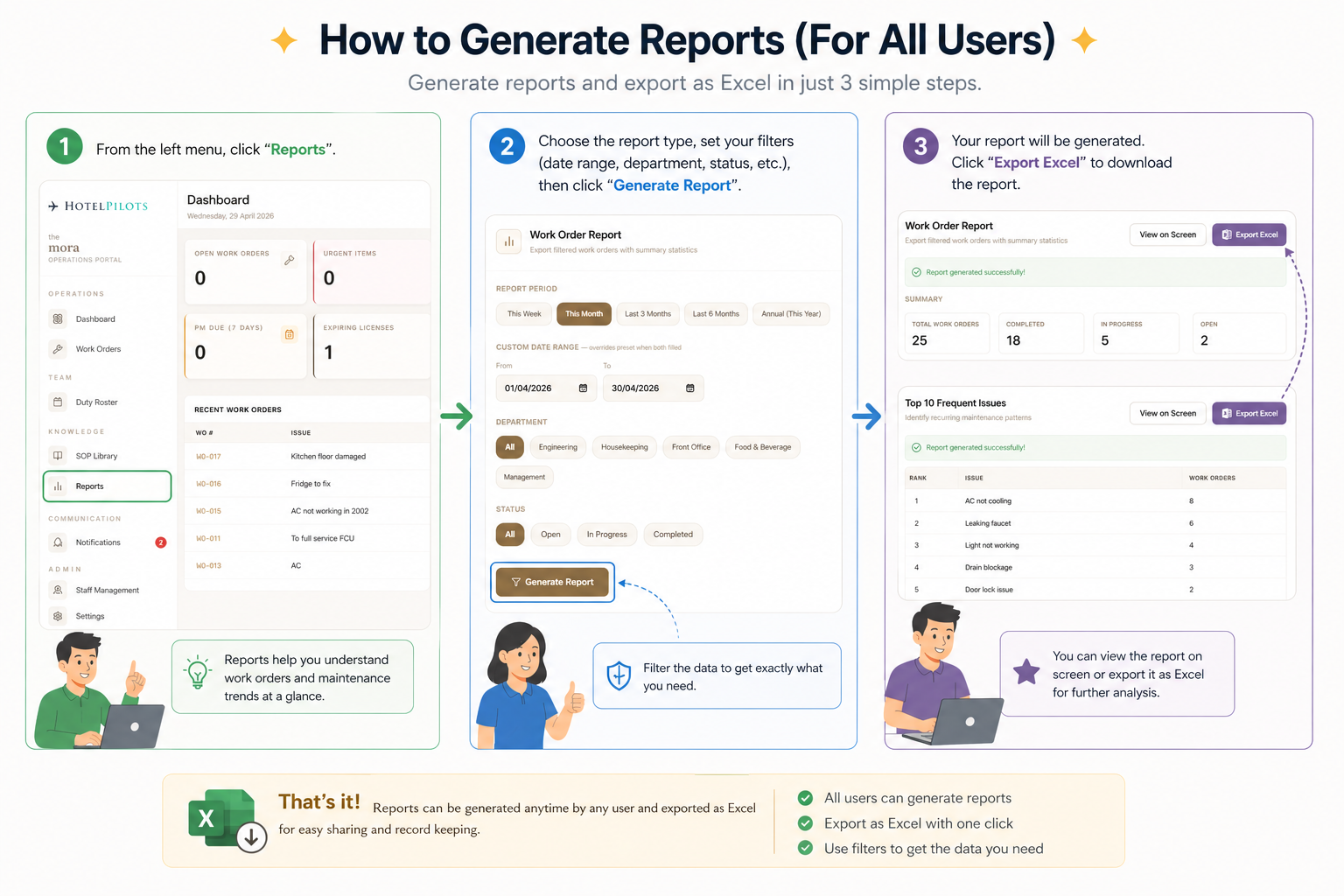
The Reports module pulls live data directly from your operations and exports it as Excel - no manual compiling, no copy-pasting. Every staff member can generate their own report instantly. Filter by department, date range, or status and get exactly the data you need.
Work Order Report
Filter and export all work orders by period, department, and status. Get a full summary of what was raised, completed, and still open - across any time range you choose.
Top 10 Frequent Issues
Identify recurring maintenance patterns across the property. Filter by department, location, keyword, and period to find what keeps breaking - and fix it at the root.
How it works
- 01
Go to Reports
Available to all staff via the sidebar
- 02
Choose report type
Work Order Report or Top 10 Frequent Issues
- 03
Set the period
This Week, This Month, Last 3 Months, Last 6 Months, Annual, or custom date range
- 04
Filter by department
Engineering, Housekeeping, Front Office, F&B, Management, or All
- 05
Filter by status
Open, In Progress, Completed, or All
- 06
Add location or keyword
Narrow down to a specific room, area, or issue type
- 07
Generate
Report is pulled live from the database and exported as Excel instantly