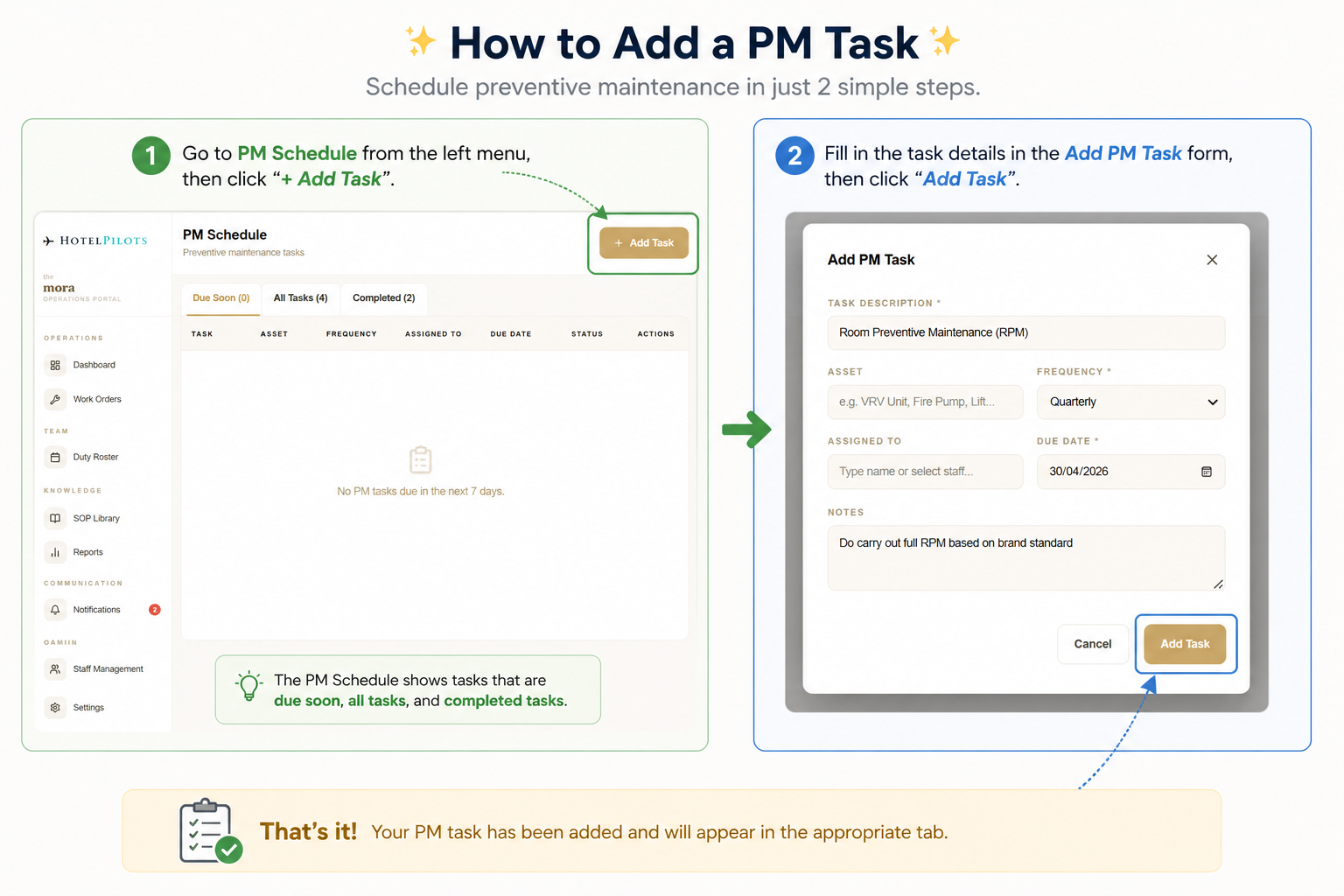
Hotel Operational Portal - PM Scheduler
Maintenance planned. Never missed.
The PM Scheduler keeps your hotel ahead of breakdowns. Instead of reacting to failures, you schedule recurring maintenance tasks for every asset - and the system automatically generates the next task when the current one is completed. No manual tracking. No missed services.
How it works
- 01
Open PM Schedule
Access via the PM Due tab on your Dashboard
- 02
Add a PM Task
Describe the task, e.g. Room Preventive Maintenance (RPM)
- 03
Specify the asset
VRV Unit, Fire Pump, Lift, or any equipment
- 04
Set frequency
Weekly, Monthly, Quarterly, or Annually
- 05
Assign to staff
Select who is responsible for completion
- 06
Set due date
When the first task must be completed
- 07
Add notes
Include brand standards or specific instructions
- 08
Complete & auto-repeat
Once marked complete, the next cycle is created automatically