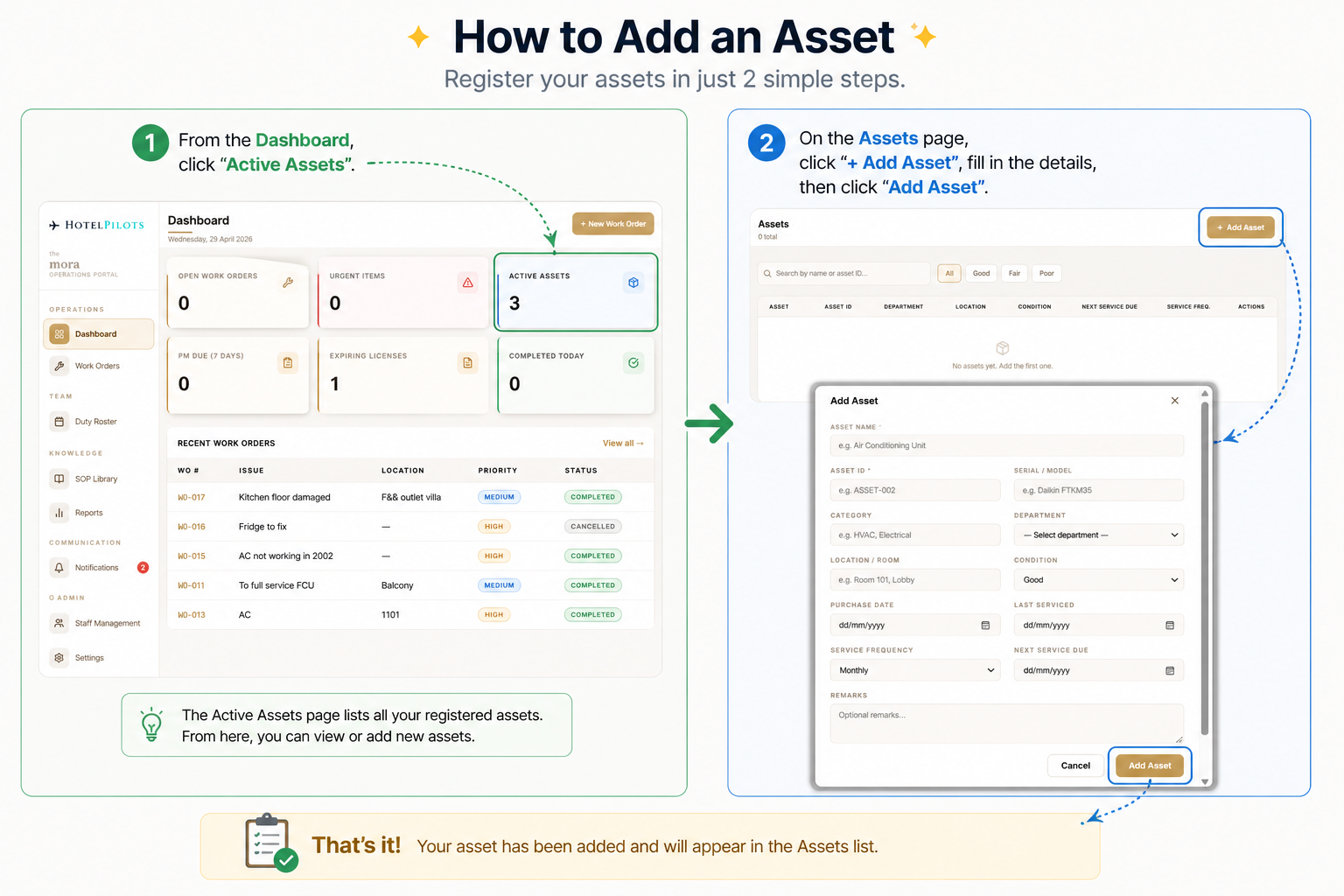
Hotel Operational Portal - Asset Registry
Every asset. Registered, tracked, and serviced on schedule.
The Asset Registry is your hotel's single source of truth for every piece of equipment. Register an asset once - the system tracks its age, condition, and service history automatically. Maintenance schedules are generated based on the frequency you set. No spreadsheets. No guessing when something was last serviced.
How it works
- 01
Add the asset
Name it clearly, e.g. Air Conditioning Unit
- 02
Assign an Asset ID
Unique identifier for tracking, e.g. ASSET-002
- 03
Enter serial / model
e.g. Daikin FTKM35 for full traceability
- 04
Set category and department
HVAC, Electrical, Plumbing, and more
- 05
Log location
Room 101, Lobby, Back-of-house, anywhere in the property
- 06
Record condition
Good, Fair, or Poor at time of registration
- 07
Set purchase date and last serviced
The system starts tracking age from here
- 08
Set service frequency
Monthly, Quarterly, Annually
- 09
System takes over
Next service date is calculated and PM tasks are generated automatically